Anti Fatigue Mats and Footwear for Standing Desks
Pick an anti-fatigue mat for a standing desk by firmness, edge shape, and size, and see how mat thickness and shoes change your desk height and trip risk.
 By BuyOnceChoice Editorial Team
Updated November 16, 2026
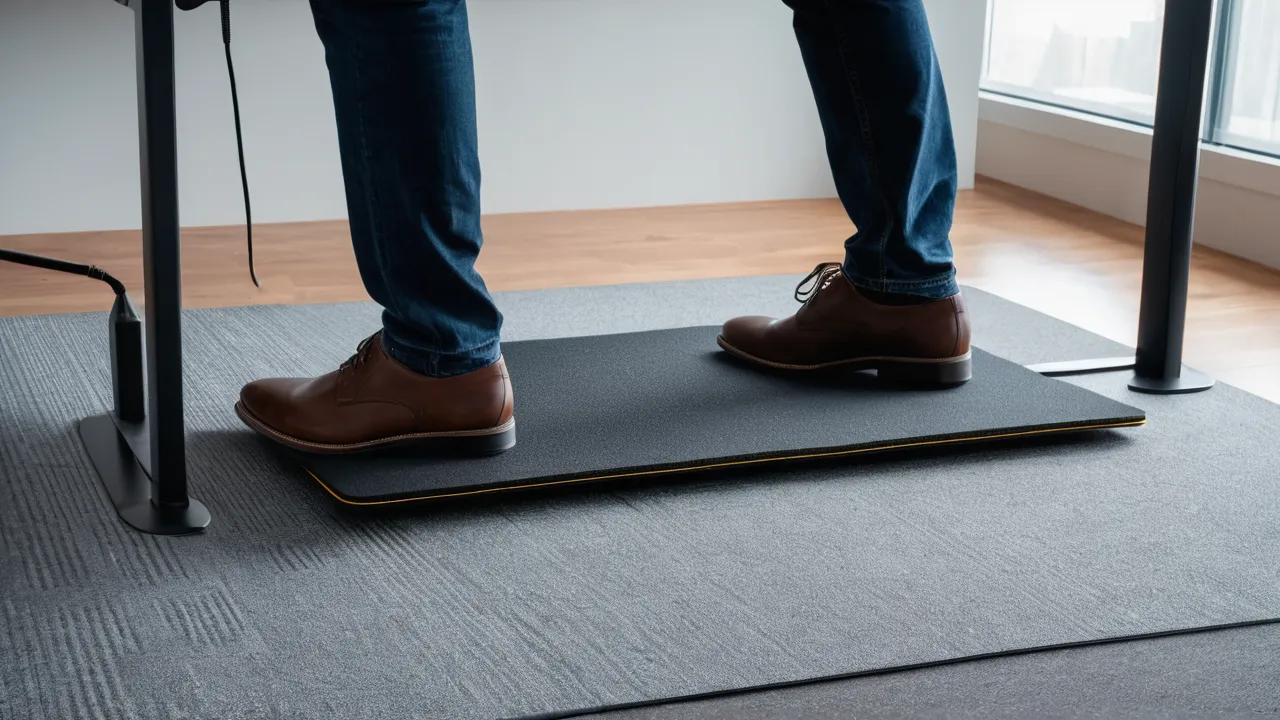
An anti fatigue mat for a standing desk is a cushioned mat that you stand on to make long periods on your feet more comfortable. Choose a mat that is firm enough not to feel mushy, with beveled edges to reduce trip risk, large enough for small shifts in stance, and thin enough that your desk height still works with it.
What a Mat Is Meant to Do
A hard floor gives no give. A mat adds a slightly springy surface that invites small movements, which many people find more comfortable over a long stretch of standing. It also adds insulation from a cold floor and some noise reduction. It is a comfort product, and it does not treat any medical condition, so talk to a health professional about persistent pain.
A mat works together with the rest of your setup. Desk height, monitor height, footwear and how often you change posture matter as much as the mat. Standing still on any surface for hours is tiring, so most people alternate between sitting and standing and shift weight while standing.
Mats come in foam, gel, rubber and mixed materials. The material, thickness and shape change the feel. The same mat can feel great to one person and wrong to another, so your own comfort is the best guide.
Firmness and Thickness
Firmness is the most personal choice. A very soft mat feels pleasant at first, though your feet sink in and you may have to work to stay balanced. A mat that is too firm adds little over the floor. Most people end up with a medium firmness that gives slightly and rebounds.
Thickness also matters.
- A thin mat, under half an inch, adds little cushion but keeps the floor close, which helps stability.
- A medium thickness around half to three quarters of an inch is common for desk mats.
- A thick mat, an inch or more, can feel unstable and raises your standing height more.
Check the product page for material, density if listed and thickness. If a page gives no thickness, ask the seller. Reviews help, though comfort is individual. If you can, stand on a mat in a store, or buy from a seller with a return window.
The mat should return to its shape. Foam that stays dented after a few hours is wearing out. Mats lose some firmness over time, so plan to replace them when they flatten.
Edges, Size, and Trip Risk
Mat edges can be a trip hazard. Choose beveled edges, which slope down to the floor, over square edges that stand up like a step. A beveled edge is easier to step on and off, and it lowers the chance of catching a toe or a chair wheel.
Size comes next.
- Width: wide enough to let you shift your feet and take small steps, often around 20 to 24 inches deep and wide enough for both feet and a little movement.
- Depth: enough to stand comfortably in front of the desk without feet hanging off the edge.
- Length: a longer mat suits a wide desk and lets you move left and right.
Check that the mat does not extend where people walk. Place it so that the edge is clear of doors and paths. Keep it flat. A curled corner is a trip risk, so replace or flatten a mat that curls.
Think about chair casters too. Rolling an office chair across a mat can be hard, and a chair can catch an edge. If you use a chair, move the mat out of the way, or use a mat designed to be rolled over. Many people simply push the mat aside when they sit.
Non slip backing helps on hard floors. On carpet, a mat can shift, so check that the backing grips the surface, or use a mat made for carpet.
Footwear and Standing
Footwear changes how a mat feels. Barefoot or in socks, you feel the surface directly, and a firm mat suits many people. In soft shoes, a soft mat can feel too unstable. In hard dress shoes, a slightly softer mat may feel better. Wear what you normally wear at the desk, and try a mat with that choice.
Some people stand barefoot or in socks at home, and wear supportive shoes at work. Others use a shoe with a cushioned sole. Make sure your shoes grip the surface of the mat and do not catch on its edges. Avoid high heels on soft mats, which can make you unsteady.
Change your stance during the day. Shift weight between feet, take small steps and alternate standing with sitting. A mat makes standing more comfortable, and movement does the rest. If you feel pain, stop and talk to a professional rather than pushing through.
Desk Height Allowance
A mat raises your standing height by its thickness, plus the compression under your weight. A half inch mat adds about half an inch, and a thicker mat adds more. Include this when you set your standing desk height.
1. Stand on the mat in your usual footwear.
2. Bend your elbows to about a right angle, with forearms parallel to the floor.
3. Set the desk surface at the height of your elbows.
4. Check the monitor so that the top of the screen sits near eye level.
5. Raise or lower the desk, and recheck after the mat settles.
Check the desk’s maximum height. If you are tall and the desk barely reaches your standing height, a thick mat could push you above its range. Many desks have a memory setting, so save the height with the mat in place, and adjust if you change shoes or mats. Our standing desks category lists models and their height ranges.
Care and Safety
Keep the mat clean and dry. Wipe it with a damp cloth and mild soap, and let it dry. Check the surface and the edges every few weeks for cracks, splits or curling. Replace a mat that has worn or lost its shape.
Follow the maker’s care instructions, since some materials react to certain cleaners. Foam can break down with harsh chemicals. Rubber mats may have a smell at first, which fades with airing. If you are sensitive to odors, air the mat before use, or choose a material with a low odor description.
Safety checklist:
- Choose beveled edges and a non slip backing.
- Keep the mat out of walkways.
- Do not use it on stairs or slippery surfaces.
- Keep cords off the mat and away from your feet.
- Stand on it with stable shoes or bare feet.
- Check the mat for wear and replace it when it curls.
If anyone in the household uses a cane, a walker or has balance problems, ask whether a mat is safe for them, since the soft surface can be unsteady.
Who Should Choose What
- Standing for long periods and want cushion: medium thickness, medium firmness, beveled edges.
- Prefer stability: a thinner, firmer mat.
- Share the desk with others: a mat with a non slip base that stays put.
- Carpeted office: a mat that grips carpet, or a firm base.
- Households with children or pets: a mat with low curl risk, beveled edges and secure placement.
For desks that need a stable base, see our best manual standing desk roundup, and read the how we review page for the way we weigh features.
A Worked Example
Imagine a person of average height who stands about two hours a day at a desk on a hard floor, in cushioned sneakers. They try a medium firmness mat around three quarters of an inch thick with beveled edges, set the desk height with the mat in place and save it as a preset. After a week, they find it comfortable, and they lean on the mat’s slight give to shift weight. If it felt too soft, they would try a firmer mat. If the mat curled at a corner, they would flatten it or replace it before it became a trip hazard.
What to Check on the Product Page
Look for thickness, material, size, edge shape, weight, backing and care instructions. Look at the return policy and the warranty. Check whether the mat has an odor note, and whether it suits carpet or hard floor. If a seller does not list the thickness or the edge type, treat that as a reason to look elsewhere.
Frequently Asked Questions
Do I need an anti fatigue mat for a standing desk?
Not strictly, but many people find one more comfortable on hard floors. It adds cushion and encourages small movements. If you stand briefly or already have carpet, you may not need one. Try it for a week, and keep it if it helps you.
How thick should an anti fatigue mat be?
Around half to three quarters of an inch is common for desk use. Thin mats give little cushion, and very thick ones can feel unstable. Pick medium firmness, check the edges for beveling and include the thickness when you set your desk height.
Are anti fatigue mats a trip hazard?
They can be, especially with square edges or curled corners. Choose beveled edges and a non slip backing, keep the mat flat and out of walkways, and replace one that curls. Be careful around chairs with casters.
Can I wear shoes on an anti fatigue mat?
Yes. Wear what you normally wear at the desk, and make sure the soles grip the mat. Very soft shoes on a soft mat can feel unstable, and high heels are not a good match. Try the mat in your usual footwear.
Final Thoughts
Choose a medium firmness mat with beveled edges, a non slip base and enough size to shift your feet. Include its thickness in your desk height, keep it out of walkways and replace it when it flattens or curls. A good mat helps, and changing position through the day helps more.
Related buying guides
- Bamboo vs Laminate vs Solid Wood Desk Tops
- Dual Motor vs Single Motor Standing Desks
- Electric vs Manual Standing Desks: Which Lasts
About the author

The BuyOnceChoice Editorial Team researches durable products worth buying once. Our guides compare published specifications, warranty terms, expert review consensus, and verified owner feedback. We do not conduct our own product trials. See How We Review and our Editorial Policy for our standards.